GIS consulting for local government, utilities and engineering firmsServing clients across the United Statesinfo@infraspatialsolutions.com
All projects

Installation, deployment and GIS transition

From the principal's project experience · client details removed

ArcGIS Enterprise
Deployment &
Migration

We work with your GIS and IT teams to install and configure ArcGIS Enterprise, migrate existing GIS data and workflows where needed, and test the services, maps and applications your staff use.

See the process

Esri provides the software. InfraSpatial Solutions carries out the deployment, configuration and migration work.

From software installation
to everyday GIS work.

We help connect the pieces: the Esri software, your databases, your maps and the people who use them. Moving data is one part of that process.

We coordinate with your IT team on the environment and access requirements. Your team provides the agreed infrastructure, licenses and approvals; we carry out the GIS setup, connection, publishing and testing work within the project scope.

Five steps.
One connected setup.

Follow the work from the first review to handover. Each step has a clear output for your team.

Step 01

Review the existing setup

Start with the work your team needs to keep doing.

We review your data, maps, applications and scheduled scripts, then agree what belongs in the new setup.

What you receive

An agreed scope, a list of dependencies and a deployment plan.

Step 02

Install and configure

Set up the Esri software and connect its components.

We install and configure Portal, Server, Web Adaptors and the required Data Store components, coordinating certificates and access with your IT team.

What you receive

A documented configuration and platform checks.

Step 03

Migrate and connect data

Bring the data across with its working relationships.

Where migration is needed, we move the required datasets and check records, domains, relationships, attachments and editing settings. We reconnect the services, applications and scripts that depend on the data, then record differences for correction and retesting.

What you receive

A source-to-target comparison and a list of resolved or outstanding issues.

Step 04

Publish and test

Check the maps and tasks people actually use.

We publish a pilot service, connect the relevant maps and applications, and test access, queries and editing with representative users before expanding the rollout.

What you receive

A publishing procedure and workflow test results.

Step 05

Document and hand over

Give your team a clear record of the setup.

We document configuration, operating steps and outstanding items. We agree the production change and recovery arrangements with your team before handover.

What you receive

Setup documentation, operating guidance and agreed responsibilities.

Explore the ArcGIS components we configure

Connect the platform
to its operational data.

Select a component to see what it does and what must be checked.

Conceptual architecture · simplified connections

GIS staff, field teams and application users
HTTPS access
Web Adaptors / approved web entry points
Federation
↔
Hosting and registered-data connections

Data Store and the enterprise geodatabase serve different purposes. Storage types, machine layout and access paths depend on the selected version and design.

Moving data means
preserving how it works.

A successful copy does not mean the data is ready for editing or publishing. The migration tooling compares the source and target, reports differences and supports another run after corrections.

See how dependencies are traced
Records, schema and spatial reference

Compare row counts, field definitions, domains, subtypes and spatial-reference properties. Treat internal SRID consistency and coordinate transformation as separate questions.

Relationships and attachments

Check relationship participants, identity keys and attachment structures. Confirm that related records and files remain accessible, rather than relying only on feature counts.

Editing history and versioning

Review tracking fields, timestamp interpretation and versioning requirements. Ambiguous history needs a decision before metadata is standardized.

Exceptions and repeatable runs

Keep skipped items and unresolved differences visible. Correct the workflow in the working environment and rerun the comparison before promoting the data.

Examples from the work.

See how deployment work addresses editing history, related files and database access. Each example comes from documented project work.

Run finding · decision required

A date can copy correctly and still mean the wrong time.

Some source tracking dates used database time. Enabling UTC tracking without reviewing the values could reinterpret their history.

Migration run record · identifying details omitted
“source tracking dates use database time; review date conversion before enabling UTC”

The implemented response

The run flagged the affected tracking configuration for a decision rather than treating the setting as an automatic fix.

What establishes acceptance

Confirm the source time convention, agree any conversion, and compare representative historical timestamps and new edits in the target.

Follow-up

Later working notes record corrective work on this issue.

ImplementedRepeatable migration and comparison checks

Schema, domains, subtypes, spatial properties, attachment structures and editing configuration.

RecordedExceptions and corrective work

Run findings and subsequent working notes show where review and correction were needed.

Next stepFinal production acceptance

A reconciled final report and end-user workflow tests.

View the anonymized platform-configuration reference
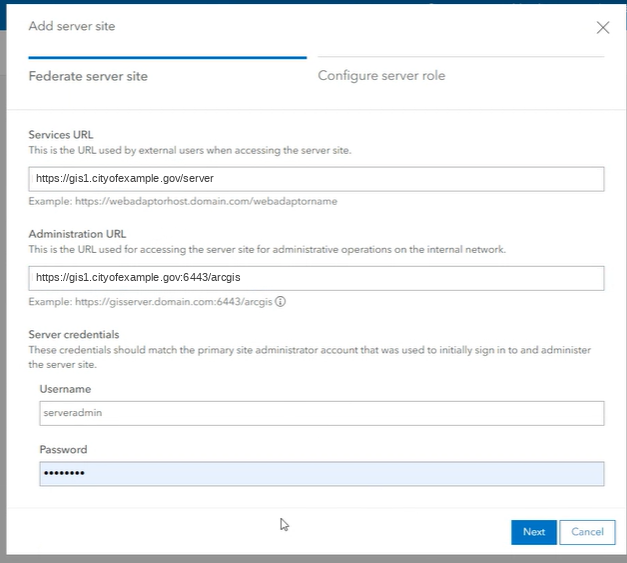
Anonymized federation configuration screen with example URLs

The installation record includes Portal, Server, Web Adaptors, certificates, federation and Data Store setup. This screen illustrates the federation inputs. Select the image to enlarge.

What must be true
before production changes.

Data is reconciled

Differences are resolved or explicitly accepted. Related records, attachments and editing settings are checked.

Services and apps work

Representative users test access, queries, edits and application tasks in the target environment.

Operations are prepared

The final refresh, backup and rollback approach, change window and support responsibilities are agreed.

What the records cover: Platform configuration, migration runs and corrections, with service-based user testing as the next step. A final reconciled comparison, cutover and production sign-off are not part of these records.

Related work and references

GIS dependency analysisUtility Network migrationEsri: Enterprise architectureEsri: migration strategies

Esri references explain the concepts. Version-specific design and requirements must be confirmed for each implementation.

Need help deploying
ArcGIS Enterprise?

Tell us about your existing setup and what your team needs to do. We can help scope the installation, configuration and transition work.

Discuss your deployment